

EN 301 549 v4.1.1: what the new version changes for your website


On September 2, 2026, the European accessibility standard got a new version. If you sell online to consumers in the EU, keep your audit and add to it. EN 301 549 now follows WCAG 2.2, which for a website means six more criteria and a rule on display settings. Here is what to check, when the new version starts to count legally, and what your agency's contract should say.
From the standard to your agency's contract
#What is the EN 301 549 standard?
EN 301 549 is the European list of accessibility requirements for digital products and services: web pages, documents, apps, self-service kiosks. Each requirement comes with its own test, so two people checking the same site reach similar results. ETSI writes it together with two other European standards bodies, at the request of the European Commission. It is a harmonized standard, the kind EU law can point to.
The law itself is the European Accessibility Act (EAA) for companies, and the Web Accessibility Directive for public sector bodies. Both set broad goals, such as a service that everyone can perceive, operate and understand. The standard says how to check those goals one requirement at a time, and for the web it mostly reuses WCAG, the W3C accessibility guidelines, as we show on one button, from the law down to its WCAG criterion.
| Text | What it contains | What it asks of you |
|---|---|---|
| EAA | Goals: sites that everyone can perceive, operate and understand, and that work with assistive technologies | Mandatory for the services it covers |
| Web Accessibility Directive | The same kind of goals for public sector sites and apps | Mandatory for public sector bodies |
| EN 301 549 | Testable requirements, each with its test | Voluntary. Once the standard is cited, a site that follows it is presumed compliant |
| WCAG | The success criteria for web content | You apply them by following the standard |
#Is your website covered?
Your site is covered if you meet two conditions. The EAA applies to any company trading in the EU, wherever it is based, so an American store selling to European consumers is in scope too.
- You offer consumers a service the EAA covers, such as online retail, banking, passenger transport or e-books. The EAA took effect on June 28, 2025.
- Your company is not a microenterprise. A microenterprise has fewer than 10 employees and no more than €2 million in annual turnover or balance sheet total, and those that provide services are exempt from the EAA.
Bobbin & Co., an online fabric shop with 15 employees that sells to consumers, meets both conditions. Its site serves as our example in every section.

Public sector bodies follow the Web Accessibility Directive and their national rules, such as the RGAA in France, on their own timeline.
#How EN 301 549 compares with Section 508 and the ADA?
American rules use the same WCAG criteria, in older versions. WCAG 2.2 keeps every earlier criterion except Parsing, so a site built to the new European version meets almost everything American rules ask of web content.
| Rule | Who it covers | WCAG baseline |
|---|---|---|
| EN 301 549, new version | Companies under the EAA, public sector bodies in the EU | WCAG 2.2 AA |
| Revised Section 508 Standards | Federal agencies and the ICT they buy | WCAG 2.0 AA |
| ADA Title II rule | State and local governments | WCAG 2.1 AA |
| ADA Title III | Businesses serving the public | No technical standard set |
The Revised 508 Standards apply the Level AA criteria of WCAG 2.0 to web and non-web content alike. A vendor selling to a federal agency describes its product in an Accessibility Conformance Report, usually written on the VPAT template. If you sell to both markets, ask for a report that covers EN 301 549 as well.
State and local governments follow a new ADA rule, which the largest of them must meet by April 26, 2027. For businesses, the Department of Justice has no detailed regulation: it names WCAG and the Section 508 Standards as helpful guidance and lets each company choose how to make its site accessible.
#What v4.1.1 changes for a website?
For a website, the new version now follows WCAG 2.2 at Level AA. A site that already meets the previous version of WCAG covers this whole part, except for six criteria. The W3C describes these six criteria along with the people they help.
| Criterion (level) | What it asks for | Who it helps |
|---|---|---|
| 2.4.11 Focus Not Obscured (AA) | The element reached by keyboard (the one with focus) is never fully hidden by other content on the page | People who navigate without a mouse |
| 2.5.7 Dragging Movements (AA) | Anything done by dragging can also be done with clicks, unless dragging is essential | People who cannot hold and move a pointer |
| 2.5.8 Target Size (AA) | Click targets of at least 24 by 24 CSS pixels, or enough space around them | People who struggle to hit small buttons placed close together |
| 3.2.6 Consistent Help (A) | Help repeated across pages keeps its place in the content order | People looking for help |
| 3.3.7 Redundant Entry (A) | Information already given in the same process is filled in or offered as a choice | People who have trouble remembering what they typed |
| 3.3.8 Accessible Authentication (AA) | Nothing to memorize, transcribe or solve to sign in, unless the step offers another method or something to help, such as a password manager | People who struggle to remember or copy things |
One criterion goes away: Parsing, WCAG criterion 4.1.1, unrelated to the standard's version number. Assistive technologies such as screen readers no longer read the HTML code themselves. The errors that criterion targeted have disappeared, or other criteria cover them.
#Display settings get their own clause
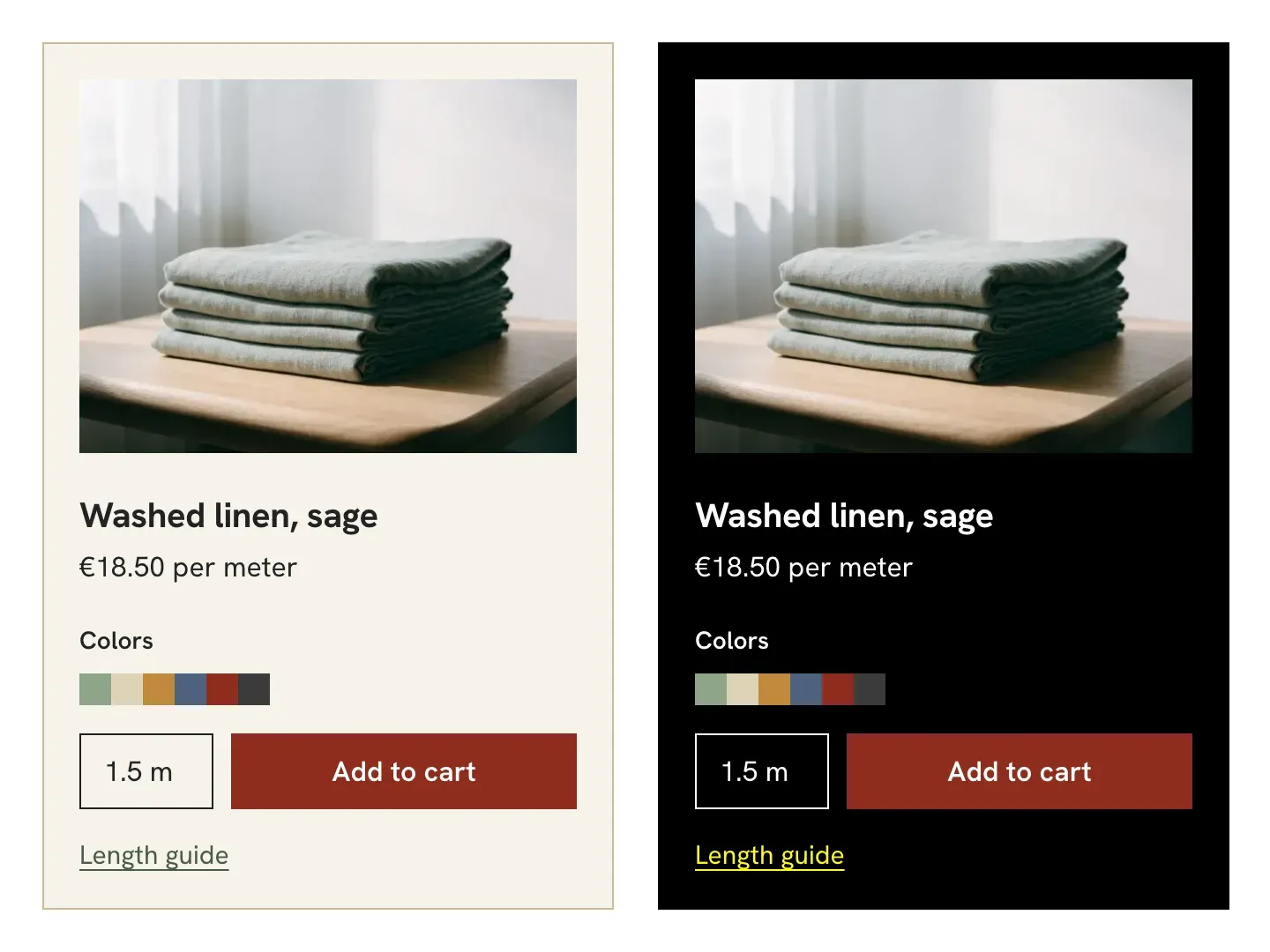
The new version also gives the web its own rule on display settings, clause 9.7. A person can choose stronger contrast, color filters or larger text, which their browser then applies to every page. The page must neither block nor override those settings.
A person with low vision who turns on a Windows contrast theme keeps those colors on every compliant site, unless honoring the setting would change the meaning or the function of the page. Bobbin & Co.'s product page shows both cases.
Downloadable documents, PDFs or office files, move to WCAG 2.2 as well. The rest of the standard depends on what your site does. The requirements on real-time text, sent letter by letter during a call, apply only to sites that offer voice or video calls.
 RGAA 5: get compliant before the new version is released
#When the new version takes legal effect?
For now, the new version has no legal effect: a version only counts once it is cited in the Official Journal of the European Union. Today only the previous version, v3.2.1, appears there, and only under the Web Accessibility Directive: no version is cited under the EAA.
That citation creates the presumption of conformity. Once the standard is cited under the EAA, a service that meets it is presumed to meet the requirements it covers, unless proven otherwise.
When a new version is cited for the public sector, the old one stays on the list for a while: six months, the last time around in 2021. A service under the EAA gets nothing of the kind, since no old version gives it a presumption of conformity. Until the citation, Bobbin & Co. has to show by its own means that its site meets the EAA.
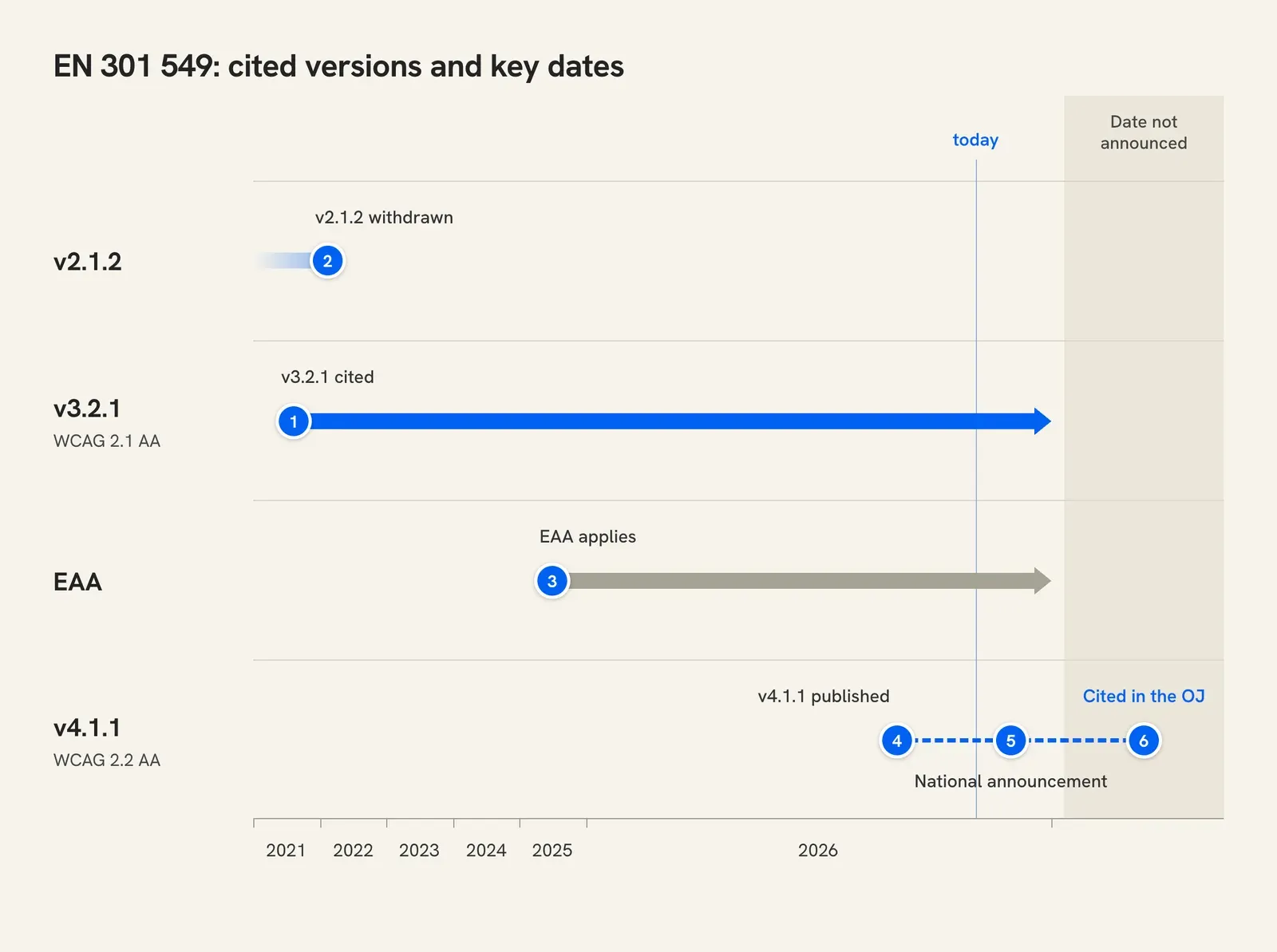
| Date | What happens | For your site |
|---|---|---|
| marker 1 August 12, 2021 | v3.2.1 is cited in the Official Journal, for the public sector | No presumption under the EAA |
| marker 2 February 12, 2022 | v2.1.2 comes off the list | A transition only for the public sector |
| marker 3 June 28, 2025 | The EAA applies | The obligation applies, with no cited standard |
| marker 4 September 2, 2026 | ETSI publishes v4.1.1 | No legal effect; start testing against it |
| marker 5 November 30, 2026 | Deadline for national standards bodies to announce the standard | No legal effect |
| marker 6 Not announced (see the box below) | The Commission cites v4.1.1 in the Official Journal | Presumption of conformity with the EAA, for the first time |
Start looking for what your site is missing now, so it is ready on the day of the citation. Either way, the EAA asks you to keep up with changes to the cited standards you rely on.
#What to do with the audit you already have?
Keep it: its verdicts still hold, because the new version carries over the old criteria almost unchanged. You find what it is missing in four steps. If you have no audit yet, start with our guide to the website accessibility audit.
- Go back to the failures under Parsing, the criterion that goes away. If one of them also fails Info and Relationships or Name, Role, Value, file it under that criterion; remove the others.
- On each page template, check the six new criteria and whether display settings are respected.
- Check downloadable documents and the requirements outside WCAG that apply to your site.
- Add the failures to the remediation plan, to fix them before the citation.
On the Bobbin & Co. site, the previous audit listed 31 failures. After these four steps, 2 leave the report and 5 join it: the remediation plan now counts 34.
| Previous findings | What becomes of them |
|---|---|
| 29 failures | Still to fix: their criteria have not changed |
| 2 failures under Parsing | Removed from the report: duplicate id attributes that nothing uses |
| To fix | What fails |
|---|---|
| Focus Not Obscured | The help bubble fixed at the bottom right fully hides the Legal notice link when it has focus |
| Target Size | The color swatches are 18 by 18 px, touching each other |
| Redundant Entry | At the confirmation step, the returns form asks again for the order number entered in step one |
| Accessible Authentication | Signing in asks for three random characters of the password, with no other method |
| Display settings | With a contrast theme, the Add to cart button stays red: it ignores the colors the person chose |
 Marker 1. Where the Legal notice link sits, with focus, hidden under the Questions? help bubble.
| Already compliant | What passes |
|---|---|
| Dragging Movements | The fabric zoom moves by dragging, and also with four arrow buttons |
| Consistent Help | Contact us stays in the footer of every page, in the same place |
| Display settings | With a contrast theme, the swatches keep their hue on purpose: the fabric's color is the information |
| Requirements outside WCAG | The site has no video and no biometrics, and help is described in its accessibility statement |
The color swatches show up in both tables. They are too small and too close together for Target Size, yet they pass the clause on display settings, since their color is the information.
#What to put in your agency's contract?
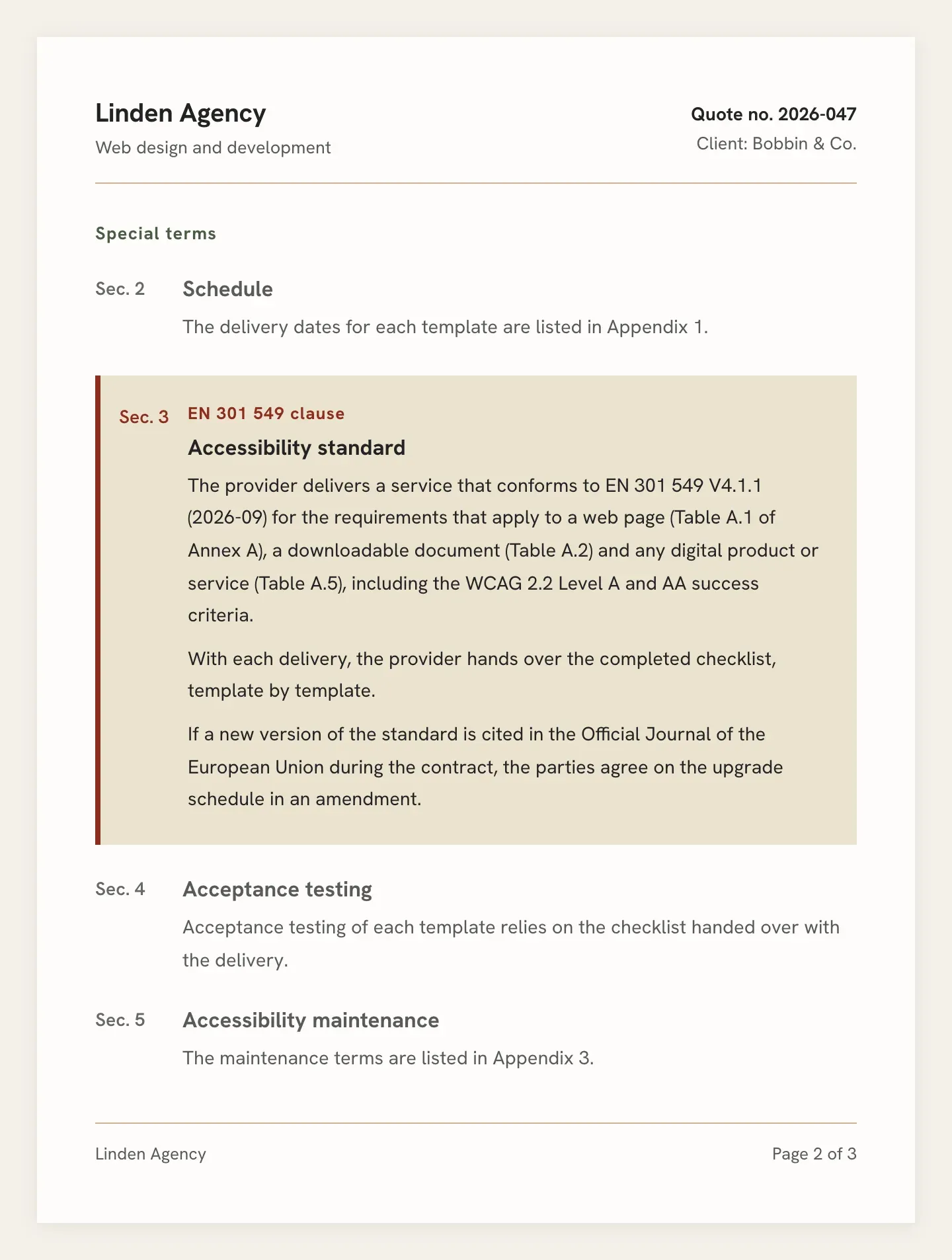
If your agency's contract only names the previous version of WCAG, it leaves out the six new criteria, display settings and the requirements specific to the standard. Name the standard, its version and the three tables of its Annex A that apply to a website: web pages, downloadable documents and any digital product or service.
Plan for the version after that as well, because you stay presumed compliant only as long as the version you follow remains cited in the Official Journal. Write it into the contract: if a new version is cited during the contract, you and the agency set the upgrade schedule in an amendment. Also ask the agency to hand over the completed checklist, template by template, with each delivery. These commitments go in the section of the contract that sets the accessibility rules, or in the statement of work.
Before you sign, ask the agency to check your templates against the six new criteria and the display settings rule, then to price and schedule the fixes.
 Forgotten Accessibility in Specifications: Who Pays the Bill?
To find what fails on your templates, you can start with an Includdy scan set to WCAG 2.2 AA. It lists what a tool can detect on each page. On the points that need a human eye, such as whether a link text makes sense, it suggests a verdict for you to confirm or correct.